The complete CRM.
At every seat.
Leads, deals, clients, invoicing, inventory and campaigns all ship in the base platform — $22 per seat. No feature tiers, nothing held back to sell you an upgrade later.
- 30-day trial
- No credit card
- Cancel anytime
Qualified
Proposal
Negotiation
Closed won
50+ business modules, 90+ integrations and 84 industry packs — all of it from $22 per seat, per month.
Six systems, one record
Every seat gets all of it. A lead becomes a client, the client gets invoiced, the invoice draws on stock — without exporting anything or paying for a second product.
Sales & pipeline
Lead capture through to close, with weighted forecasting, competitor tracking, and one-click conversion to a client record.
Leads · Deals · Forecast · Quotes
Clients & contacts
Company and contact records with attachments, custom fields, and a timeline that shows every touch in date order.
Clients · Companies · Contacts · Custom fields
Finance
Raise and send invoices, record payments, run expenses through an approval chain, and hold it all against a budget.
Invoices · Expenses · Budgets · Payments
Inventory & products
A catalogue with live stock levels, low-stock alerts, supplier records, and line items that flow straight onto an invoice.
Products · Stock · Suppliers · SKUs
Campaigns
Build segments from any field in the CRM, run multi-channel campaigns against them, and attribute revenue back to source.
Campaigns · Segments · Sequences · Attribution
Access & audit
Role-based permissions per module, two-factor sign-in, IP rules, SSO, and an audit log that cannot be edited after the fact.
RBAC · 2FA · SSO · Audit log
Screens from the running product
Not a mock-up and not a concept render. This is what your team opens on Monday morning.
-
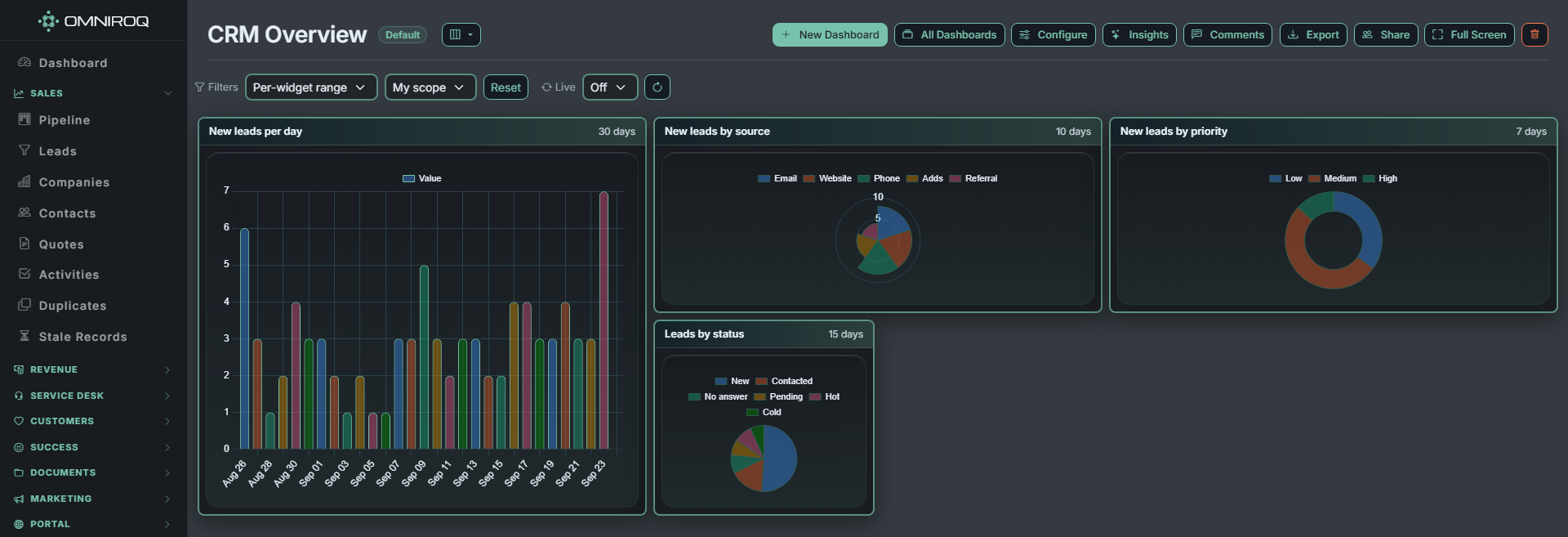
Dashboards you assemble yourself
Leads by source, priority and status, live. Drag widgets into the arrangement your team reads fastest.
-
Navigation that follows the work
Sales, Revenue, Customers, Marketing and Finance each collapse to a single row when you are not in them.
-
Themed to your brand
Light or dark, your colours, your typeface, your corner radius. Set once, applied everywhere.
-
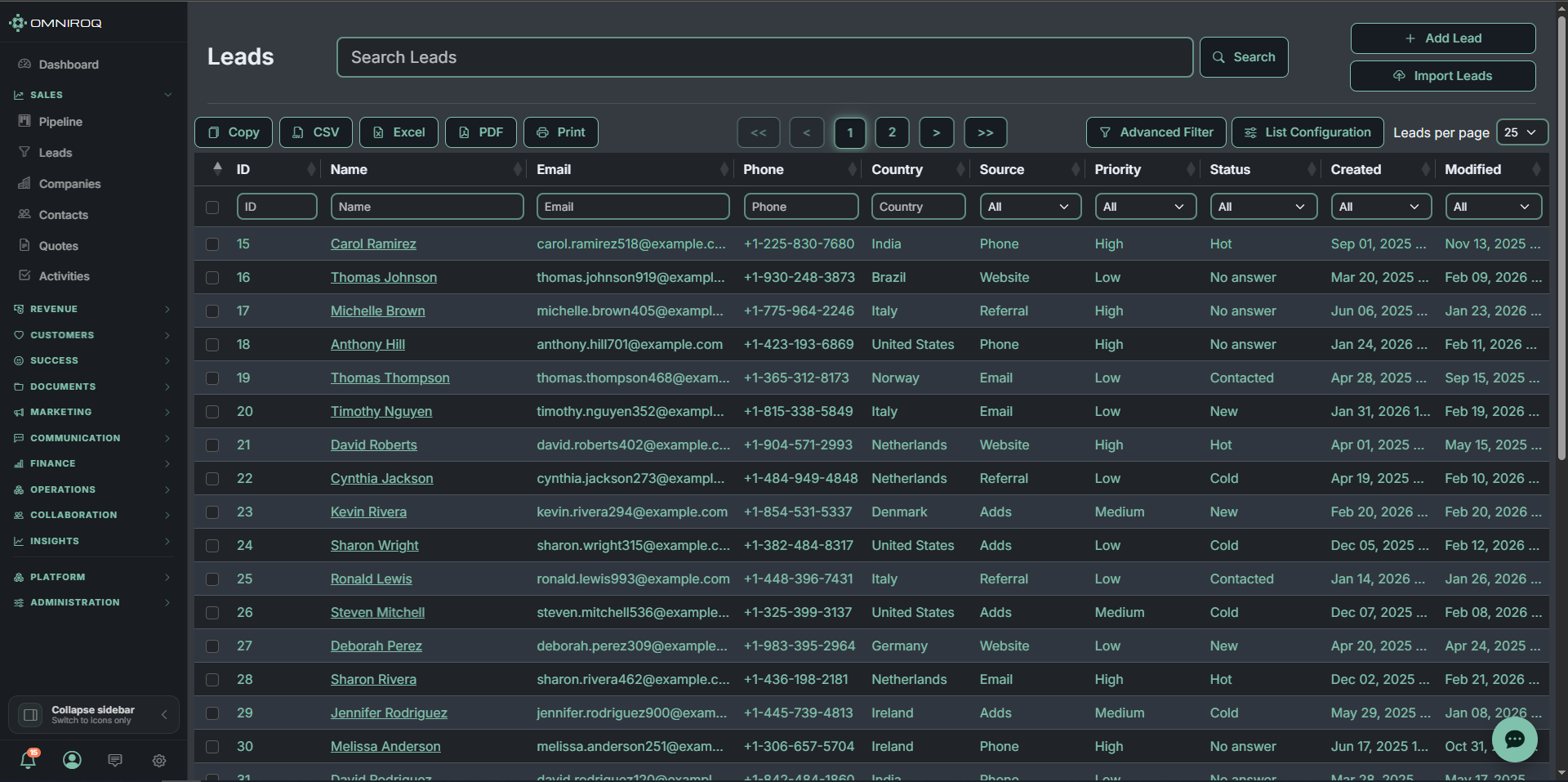
Tables that hold up at scale
Sort, filter and search across tens of thousands of records without waiting. Bulk-edit the selection, export the rest.
-
Columns per person
Show the fields that matter to you, save the view, and share it with the team or keep it to yourself.
-
Data in and out
Import from CSV with column mapping. Export any view to CSV, Excel or PDF.
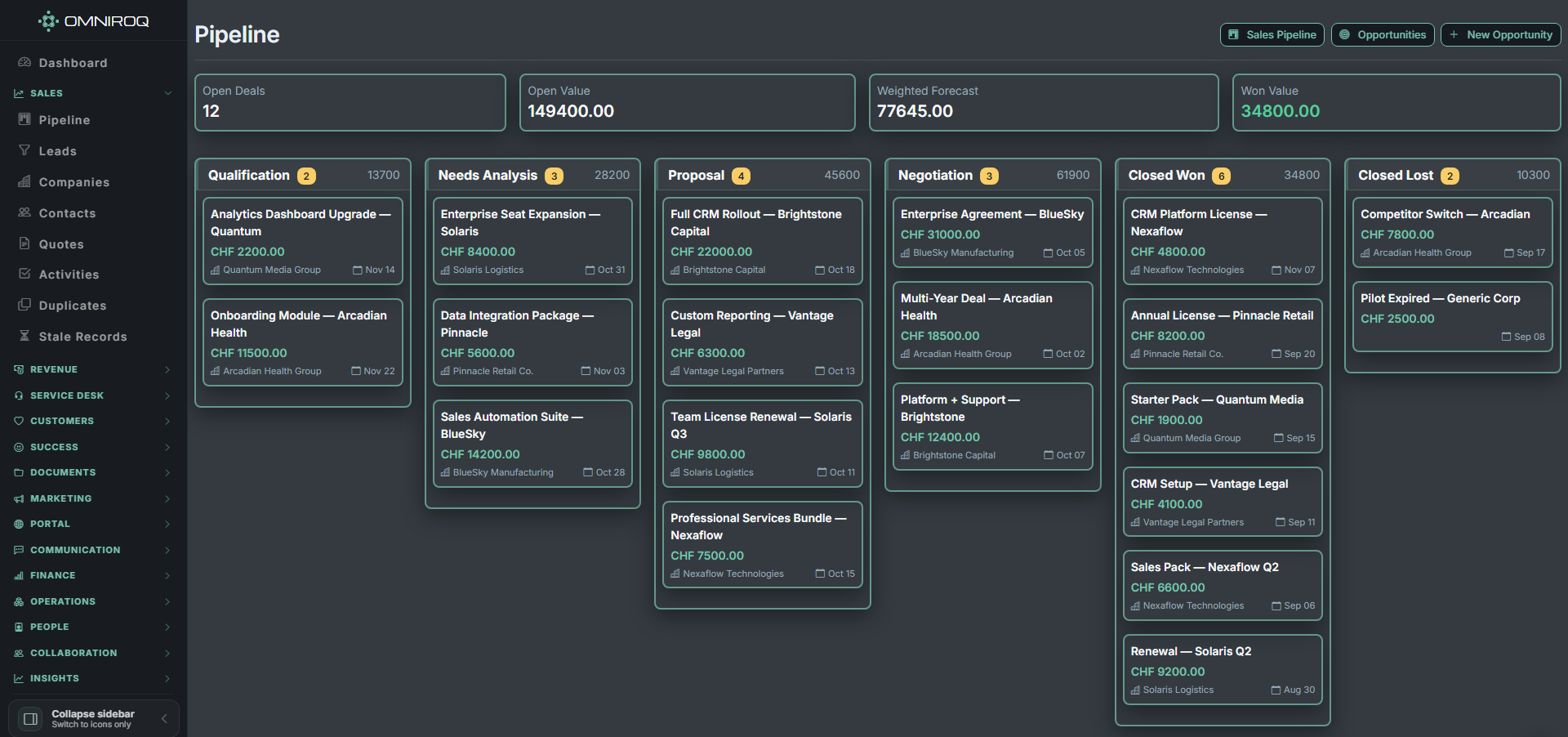
See every deal, and what it is worth
A drag-and-drop pipeline with weighted forecasting, so the number at the top of the board is the one you can actually commit to.
-
Stage-by-stage board
Move a deal and the forecast updates with it.
-
Weighted forecast
Open value and probability, not just a wish list.
-
Linked to the account
Every card carries its company and close date.
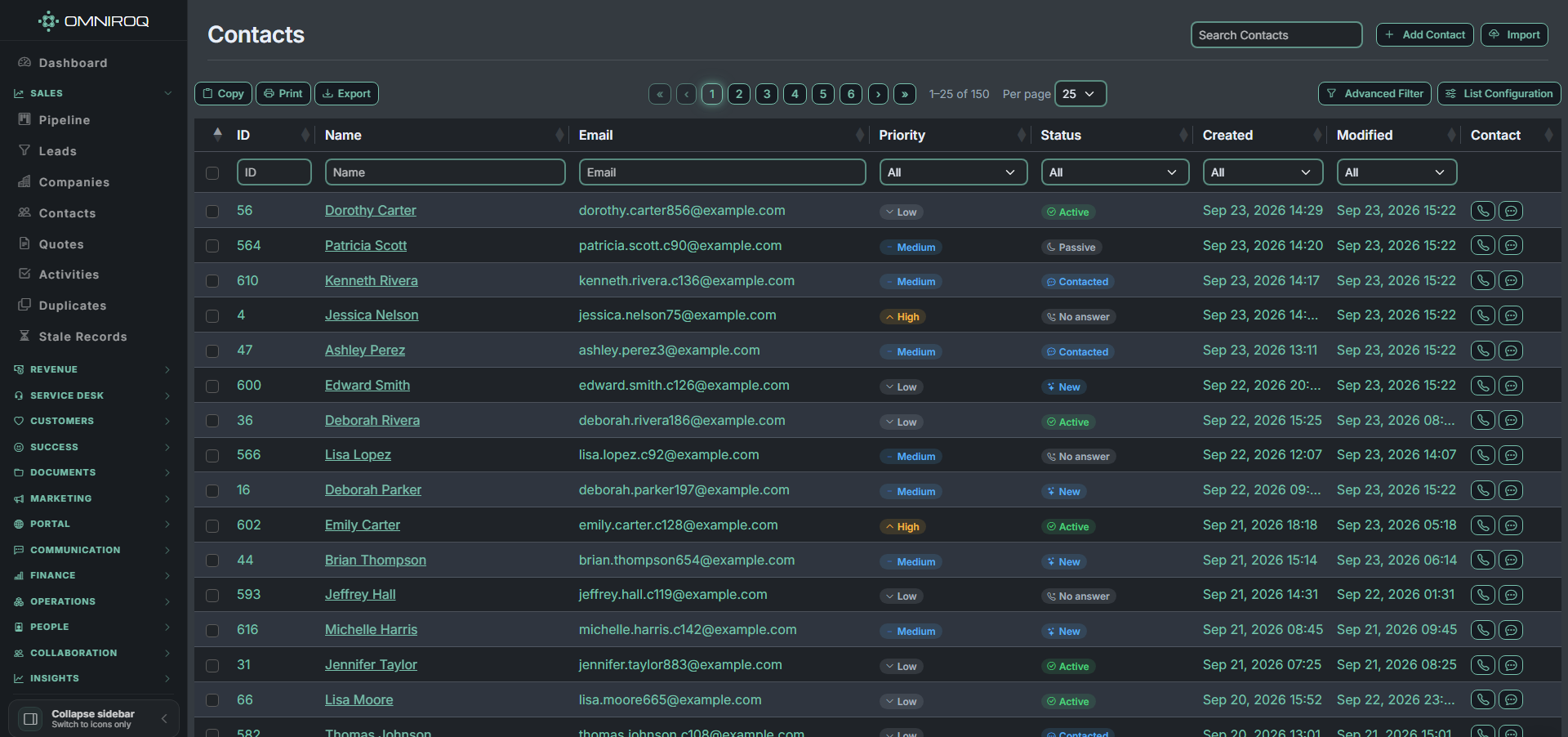
Contacts that stay findable at scale
Per-column filters, saved views and server-side pagination — the list stays fast at seventy contacts or seventy thousand.
-
Filter on any column
Priority, status, dates — combine as many as you need.
-
Configure the columns
Each person arranges the list for their own job.
-
Export what you filtered
The export is the list you are looking at, not everything.
84 industry packs, already configured
Install a pack and the workspace rebuilds itself around your sector — the objects, fields, pipeline stages and document templates that trade actually uses. Seconds, not a consulting engagement.
Real estate
Listings, viewings, commission splits
Healthcare
Patients, appointments, referrals
Legal
Matters, time entries, billing
SaaS & tech
Accounts, subscriptions, renewals
Agency
Projects, retainers, deliverables
Recruitment
Candidates, openings, placements
Finance
Wealth management, lending
77 more
Browse the full catalogue
ConstructionHospitalityLogisticsEducationAutomotiveNonprofitRetailFitnessTravelField servicesInsuranceManufacturing
90+ integrations with the rest of your stack
Native two-way connectors and webhooks. No middleware subscription sitting between your CRM and your accounts package.
Communication
Slack · Microsoft Teams · Zoom · Discord · Twilio · WhatsApp
Developer & ops
GitHub · GitLab · Jira · Linear · Zapier · n8n
Email & marketing
Mailchimp · SendGrid · Mailgun · Brevo · ActiveCampaign · Postmark
Payments
Stripe · PayPal · Square · Adyen · GoCardless · Razorpay
Accounting & ERP
QuickBooks · Xero · Sage · FreshBooks · NetSuite · SAP
Commerce & ads
Shopify · WooCommerce · Meta Ads · Google Ads · Amazon · TikTok
Also connects to Google Workspace, Microsoft 365, Notion, ClickUp, Salesforce, HubSpot, Pipedrive, OpenAI, Anthropic and Gemini.
Your support desk can see the customer.
A ticket in a standalone help desk knows an email address. A ticket here knows the company, the contract it falls under, the deal in flight, the invoice that is overdue and the asset that failed — because the desk and the CRM are the same database, not two products with a connector between them.
Who is asking
The requester resolves to a real contact at a real company. VIP status, entitlement and the SLA that applies come from the account record, not from a tag someone remembered to set.
What it is about
Link a ticket to a deal, quote, invoice, contract, asset, project or knowledge article. Typed links, so “affected asset” and “related deal” mean different things and can be reported on.
Seen from both sides
Open a company, a contact, a deal or an asset and its tickets are already there. Sales sees the support history before the renewal call; support sees the deal before promising a fix date.
One automation engine
The same workflows that move a deal escalate a ticket. No second automation tool to learn, and no rules that cannot see across the line because the line does not exist.
One customer portal
Customers track tickets, read the knowledge base, see their quotes, orders and documents in one place — and portal users are free, however many you have.
ITSM when you need it
Incidents, problems, changes with CAB approval, a service catalogue and a CMDB — sitting on the same asset records your field engineers already maintain.
Prefer to buy the desk alone? It is $26 per agent, and everything above still works the day you add the rest.
Every app, in both tiers
There is no module you have to buy separately and no feature held back for a higher tier. Switch anything on mid-month; switch it off and the data stays where it is.
Sell & serve
included at every seat
- Leads, deals & pipeline
- Contacts & companies
- Quotes, CPQ & e-signature
- Service desk, SLAs & CSAT
- Knowledge base & deflection
- Customer portal & storefront
- Campaigns, sequences & segments
- Telephony, chat & shared inbox
Run the business
included at every seat
- Invoicing, expenses & finance
- Inventory, purchasing & suppliers
- Projects, tasks & time tracking
- Planner, scheduling & field service
- Automation & no-code workflows
- Dashboards, reports & forecasting
- Custom fields, objects & layouts
- Roles, permissions & audit log
Plus 84 industry packs and 130+ integrations, at no extra cost.
Three steps, one afternoon
No implementation partner, no configuration files, no kickoff call before you can look at it.
-
01
Create the workspace
Register with an email address. The 30-day trial starts immediately and does not ask for a card.
-
02
Invite the team
Send invitations by email. Each person sets their own credentials and lands in the workspace with the role you gave them.
-
03
Install your pack
Pick the industry pack, switch on the modules you want, connect your tools, and import the records you already have.
Two tiers. Every app in both.
No Starter, no Professional, no call-us tier, and nothing held back to sell you later. You pay per seat, and the price you sign up on is the price you keep — it does not rise at renewal.
Standard — every app
$22
per seat / month
Billed annually · $27.50 billed monthly (20% less on annual)
Start free trial30 days free · No credit card · Free forever for up to 3 people on one app
Premium
$44
per seat / month
Billed annually · $55 billed monthly (20% less on annual)
Start free trialEverything in Standard, plus the Premium additions listed
Seat types
Full
Edits pipeline, configuration and finance
$22
Team
Reads, comments, owns tasks and timesheets — 40% of a full seat
$8.80
Portal / customer
Your customers in the portal and service desk
Free
Premium adds
- Self-hosting
- External API & higher limits
- Multi-company consolidation
- SSO / SAML with SCIM
- Field-level permissions
- Retention & legal hold
- Sandbox
- Priority support
Your customers are free. Portal and service-desk users never consume a seat, at any number. AI runs on credits — 500 included per seat each month, then $10 per 1000. See everything included.
Just the Service Desk?
sold on its own, priced per agent
Omniroq Service Desk
Tickets, SLAs, incidents, problems and changes, CMDB,
service catalogue, knowledge base and the customer portal — without
the CRM. Light agents who only read and comment are free, at any number.
$26
Per agent / month, billed annually · $32.50 billed monthly.
Start a Service Desk trial —
or take the full platform above and get the desk included.
The things people ask first
- How does $22 per seat actually work?
- A full seat costs $22 a month on Standard and gets every app — leads, clients, deals, service desk, portal, finance, inventory, campaigns, projects, dashboards, automation and the API. There are no per-module charges. Team seats, for people who only read and comment, cost 40% of that; your own customers in the portal and service desk are free and unlimited. The price you sign up on does not rise at renewal.
- What is in the free trial?
- Thirty days with the core platform and every add-on module unlocked, so you can build the configuration you would actually buy and see the real monthly figure before deciding. No card is required to start.
- Per seat or per workspace — which is cheaper?
- Per-seat modules scale with headcount, which suits small teams. Per-workspace modules are a flat fee whatever the team size, so they win once you are past roughly fifteen seats. You can mix both, and you can move a module between billing types at renewal.
- What does an industry pack change?
- Installing a pack creates the custom objects, fields, pipeline stages, roles and document templates that sector works with — a Real Estate pack adds properties and viewings, a Legal pack adds matters and time entries. There are 84 packs, and installing one takes seconds. You can edit anything it creates afterwards.
- How do permissions work across a team?
- Role-based access control is in the base platform, not an enterprise upsell. Build custom roles, grant or deny per module, and manage several teams inside one workspace. Every permission change is written to the audit log.
- How is our data protected?
- Everything moves over HTTPS. Two-factor sign-in, IP restrictions, session management and an append-only audit log are included on every account, along with GDPR tooling for export and erasure requests. SSO and an SLA are available on enterprise agreements.
- Can we leave?
- Yes. Add or remove seats and modules whenever you like, and cancel without a notice period. Export every module to CSV on the way out. Your data is retained for 180 days after closure in case you come back.
Start with the whole product.
Thirty days, every module unlocked, no card. If it is not the right fit you will know inside a week.